> ## Documentation Index
> Fetch the complete documentation index at: https://docs.berrybyte.net/llms.txt
> Use this file to discover all available pages before exploring further.
# Connection Issues
> Fix common connection problems when players cannot join your server.
If you or other players can’t connect to your server, don’t worry, most issues are easy to fix. This guide covers the most common reasons a server becomes unreachable and how to solve them quickly.
***
## Is Your Server Running?
Your server must be **online** before anyone can join.
Check the top of your panel:
* **Running** → OK
* **Starting** → wait 1–3 minutes
* **Stopping** → wait for shutdown
* **Offline** → click **Start**
If your server is stuck on **Starting**, check your latest logs.
***
## Check Your Server IP & Port
Make sure you’re using the correct:
* **IP Address**
* **Port**
* **Connection Address** shown in your panel
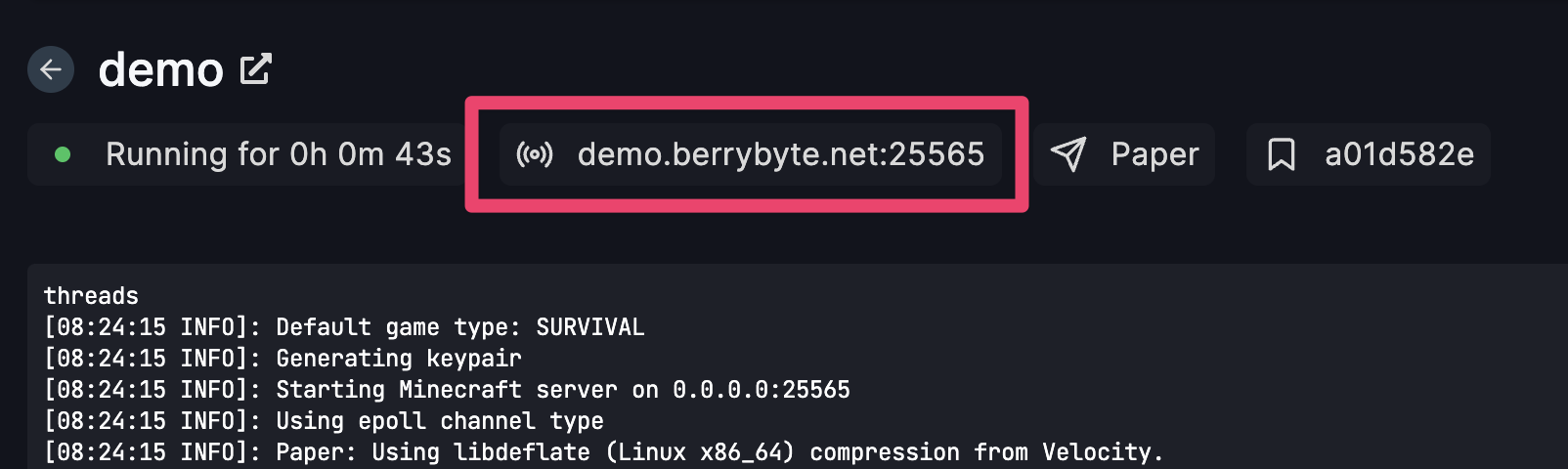 Copy/paste exactly as shown — even one wrong number will prevent joining.
***
## Restart Your Server
Restarting fixes:
* Port binding issues
* Temporary crashes
* Cached mods/plugins
* Stuck processes
Click **Restart** and try again.
***
## Incorrect Game Version
The most common reason players can’t join.
Check that:
* Your server is on the **same version** as your game client
* Mods/plugins match the version
* You didn’t accidentally update your game but not your server
If your game auto-updated, update your server too.
***
## Mods / Plugins Causing Crashes
If you recently added mods, plugins, or resource packs:
* Stop your server
* Remove the most recent additions
* Start again
* Check your logs for errors
A bad mod/plugin can break the startup process and block connections.
***
## Network / Firewall Restrictions
Some networks block game traffic:
* School WiFi
* Work networks
* Public hotspots
* Parental controls
* VPN conflicts
Try:
* Using mobile hotspot
* Disabling VPN
* Switching networks
If your players can connect but **you** can’t → this is the cause.
***
## Server Is Still Starting Up
Heavy modpacks or large worlds may take **longer to boot**.
Wait 2–5 minutes if you see:
* "Preparing spawn"
* "Loading world"
* "Starting server"
* "Loading mods"
Avoid spamming **Start** — it may interrupt loading.
***
## Resource Limits Reached
If your RAM or CPU is maxed out, your server may become unreachable.
Check your **Resource Usage** tab:
* RAM pinned at 100% → add more or remove mods
* CPU spikes → restart or optimize
* Disk usage full → delete logs or old worlds
***
## Your Server Was Updated / Restarted Automatically
If you recently installed:
* New version
* New mods/plugins
* New world
You must restart your server to apply changes.
***
## Still Can't Connect?
If none of the above solved it, include this info when contacting support:
* Your **server ID**
* The **IP + Port** you’re using
* A screenshot of your **logs**
* What changed before the issue began
Still not working? [Get help](https://berrybyte.net/contact)
Copy/paste exactly as shown — even one wrong number will prevent joining.
***
## Restart Your Server
Restarting fixes:
* Port binding issues
* Temporary crashes
* Cached mods/plugins
* Stuck processes
Click **Restart** and try again.
***
## Incorrect Game Version
The most common reason players can’t join.
Check that:
* Your server is on the **same version** as your game client
* Mods/plugins match the version
* You didn’t accidentally update your game but not your server
If your game auto-updated, update your server too.
***
## Mods / Plugins Causing Crashes
If you recently added mods, plugins, or resource packs:
* Stop your server
* Remove the most recent additions
* Start again
* Check your logs for errors
A bad mod/plugin can break the startup process and block connections.
***
## Network / Firewall Restrictions
Some networks block game traffic:
* School WiFi
* Work networks
* Public hotspots
* Parental controls
* VPN conflicts
Try:
* Using mobile hotspot
* Disabling VPN
* Switching networks
If your players can connect but **you** can’t → this is the cause.
***
## Server Is Still Starting Up
Heavy modpacks or large worlds may take **longer to boot**.
Wait 2–5 minutes if you see:
* "Preparing spawn"
* "Loading world"
* "Starting server"
* "Loading mods"
Avoid spamming **Start** — it may interrupt loading.
***
## Resource Limits Reached
If your RAM or CPU is maxed out, your server may become unreachable.
Check your **Resource Usage** tab:
* RAM pinned at 100% → add more or remove mods
* CPU spikes → restart or optimize
* Disk usage full → delete logs or old worlds
***
## Your Server Was Updated / Restarted Automatically
If you recently installed:
* New version
* New mods/plugins
* New world
You must restart your server to apply changes.
***
## Still Can't Connect?
If none of the above solved it, include this info when contacting support:
* Your **server ID**
* The **IP + Port** you’re using
* A screenshot of your **logs**
* What changed before the issue began
Still not working? [Get help](https://berrybyte.net/contact)