> ## Documentation Index
> Fetch the complete documentation index at: https://docs.berrybyte.net/llms.txt
> Use this file to discover all available pages before exploring further.
# Cancel Subscription
> How to cancel your game server subscription and understand what happens to your data.
You can cancel your server anytime. No hidden fees or lock-ins.
***
## Before You Cancel (Optional)
If you want to keep your world, saves, or files:
* Create a backup
* Download the backup to your computer
Once your subscription is cancelled and processed, **all server data is permanently deleted**.
***
## How to Cancel
### 1. Log in to Billing
Go to **[billing.berrybyte.net](https://billing.berrybyte.net/login)** and select the service you want to cancel.
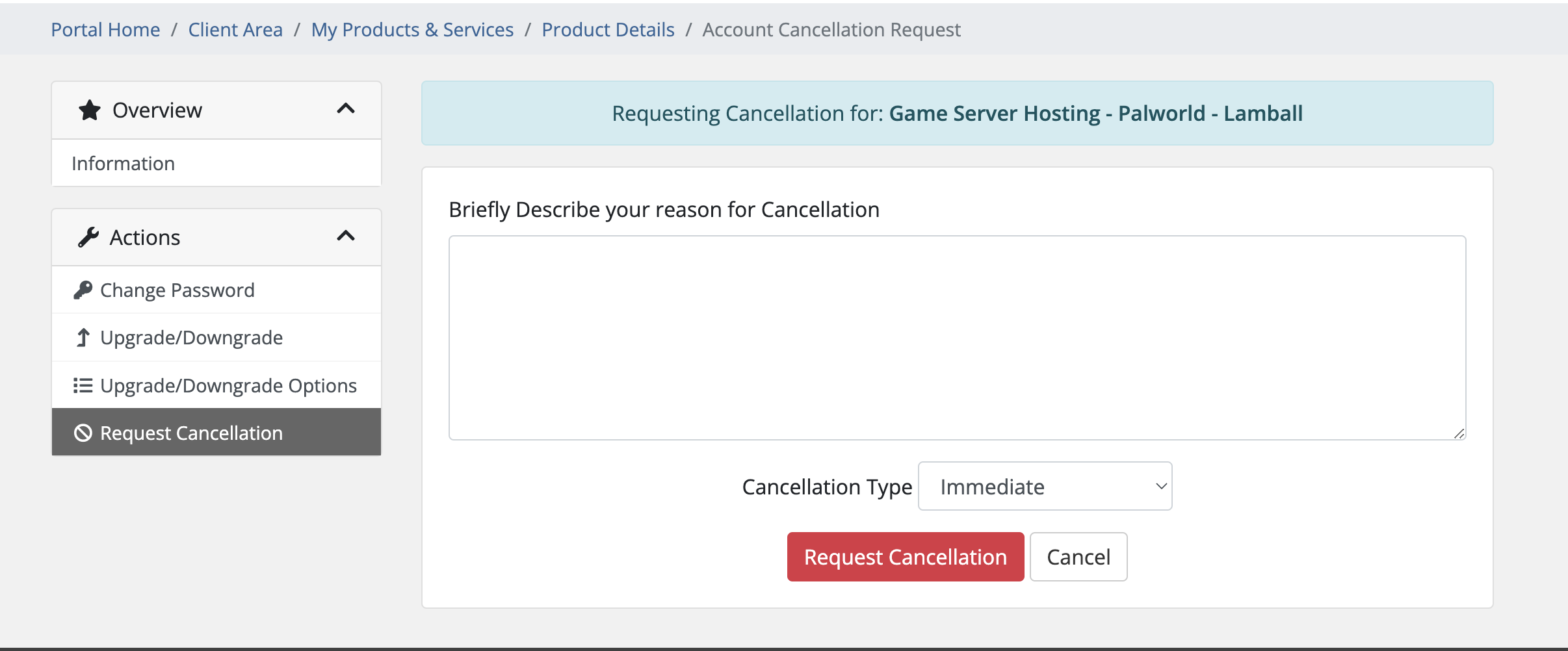
### 2. Request Cancellation
Click **Request Cancellation** and choose:
* **Immediate** — deletes the server as soon as cancellation is processed
* **End of Billing Period** — your server stays online until your next renewal date
 Cancellations are processed daily at **9AM CST**.\
After processing, all server data is removed and cannot be recovered.
***
## Having Issues?
### Can't find the cancellation button?
* Double-check you're logged into the correct billing account
* Still stuck? [Contact support](https://berrybyte.net/contact)
### Want to keep your data?
* Make a backup before cancelling
* Download the backup to your computer for safekeeping
### Cancelled by mistake?
* [Contact us immediately](https://berrybyte.net/contact)
* If the server hasn’t been deleted yet, we can reactivate it
***
Still need help? **[Get support](https://berrybyte.net/contact)**
Cancellations are processed daily at **9AM CST**.\
After processing, all server data is removed and cannot be recovered.
***
## Having Issues?
### Can't find the cancellation button?
* Double-check you're logged into the correct billing account
* Still stuck? [Contact support](https://berrybyte.net/contact)
### Want to keep your data?
* Make a backup before cancelling
* Download the backup to your computer for safekeeping
### Cancelled by mistake?
* [Contact us immediately](https://berrybyte.net/contact)
* If the server hasn’t been deleted yet, we can reactivate it
***
Still need help? **[Get support](https://berrybyte.net/contact)**