> ## Documentation Index
> Fetch the complete documentation index at: https://docs.berrybyte.net/llms.txt
> Use this file to discover all available pages before exploring further.
# How to Join a Valheim Server
> Step-by-step guide to joining Valheim servers for multiplayer Viking adventures. Learn how to find your server IP, connect to dedicated servers, and troubleshoot common connection issues for seamless co-op gameplay.
# How to Join a Valheim Server
This guide shows you how to connect to your Valheim server for multiplayer gameplay with friends.
## Finding the IP address
Before you can join and connect to your [Valheim server](https://berrybyte.net/valheim-server-hosting), you'll need to find the [IP address](https://whatismyipaddress.com/ip-address) (a combination of numbers, e.g `104.167.215.1`).
1. Login to the [game control panel](https://game.berrybyte.net)
2. Locate the subdomain or IP:port below the name of the server
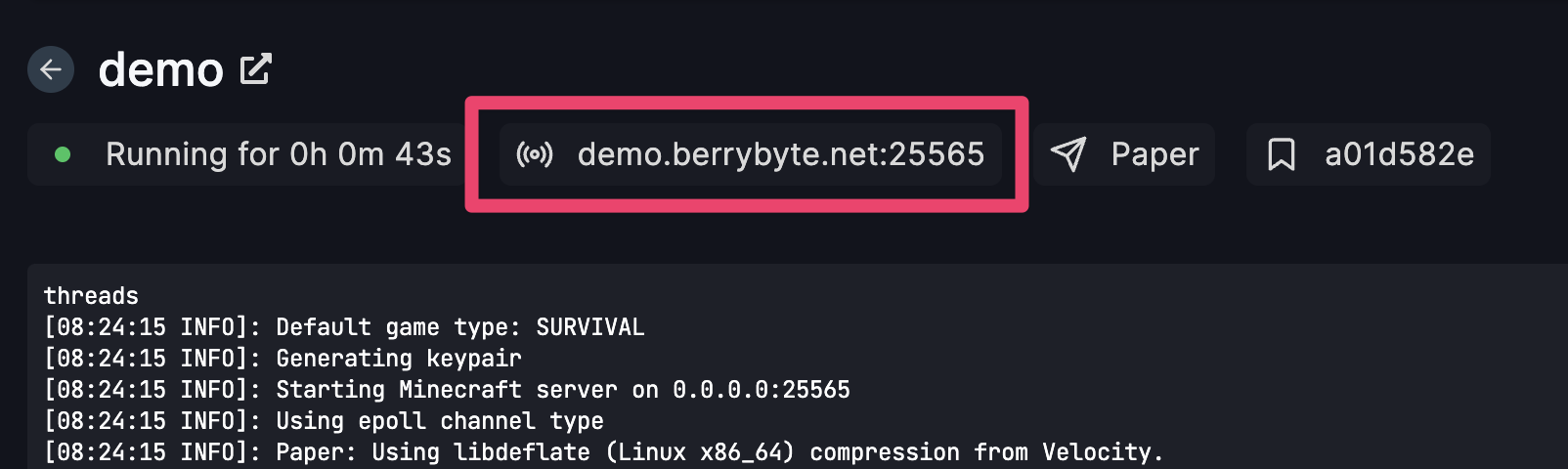 3. Click on the highlighted area box and it will copy the IP to your clipboard
## Joining the multiplayer Valheim server
1. Launch Valheim from Steam
2. Select **Join Game** from the main menu
3. Click on the **Join IP** tab at the top of the server browser
4. Enter the IP address and port of your server into the connection field
5. Enter the server password if one is set
6. Click **Connect** which will connect and load you into your multiplayer Viking world!
Allow the server a few moments to accept the connection and then voilà, you should now be able to join your Valheim server and begin your epic Viking adventure!
## Common Issues
**Issue**: Server may be offline or IP address incorrect
* **Solution**: Verify server is running in control panel and double-check IP address
* **Additional check**: Ensure the server has fully started up (can take 1-2 minutes)
**Issue**: Network connectivity or firewall blocking connection
* **Solution**: Check firewall settings and ensure port 2456-2458 are accessible
* **Router check**: Verify port forwarding is configured correctly if self-hosting
**Issue**: Direct connection required for dedicated servers
* **Solution**: Use the IP address connection method instead of browsing the server list
* **Note**: berrybyte servers require direct IP connection for optimal performance
**Issue**: Client and server running different Valheim versions
* **Solution**: Ensure both client and server are updated to the same version
* **Steam check**: Verify game updates are installed through Steam
**Issue**: Incorrect server password or password not set
* **Solution**: Check with server admin for correct password or verify password in server settings
* **Case sensitivity**: Ensure password matches exactly including capitalization
**Issue**: Server world may be corrupted or still generating
* **Solution**: Wait for world generation to complete or contact server admin
* **Backup check**: Server admin should verify world backup integrity
## Related Guides
* [Setup Valheim Server](/games/valheim/setup-server) - Initial server configuration and installation
* [Control Panel Overview](/panel/overview) - Understanding your server management interface
* [Server Backups](/panel/backups) - Protect your world data
* [File Management](/panel/importing-files) - Upload and manage server files
Running into issues? Join our [Discord community](https://berrybyte.net/discord) or [contact support](https://berrybyte.net/tickets).
3. Click on the highlighted area box and it will copy the IP to your clipboard
## Joining the multiplayer Valheim server
1. Launch Valheim from Steam
2. Select **Join Game** from the main menu
3. Click on the **Join IP** tab at the top of the server browser
4. Enter the IP address and port of your server into the connection field
5. Enter the server password if one is set
6. Click **Connect** which will connect and load you into your multiplayer Viking world!
Allow the server a few moments to accept the connection and then voilà, you should now be able to join your Valheim server and begin your epic Viking adventure!
## Common Issues
**Issue**: Server may be offline or IP address incorrect
* **Solution**: Verify server is running in control panel and double-check IP address
* **Additional check**: Ensure the server has fully started up (can take 1-2 minutes)
**Issue**: Network connectivity or firewall blocking connection
* **Solution**: Check firewall settings and ensure port 2456-2458 are accessible
* **Router check**: Verify port forwarding is configured correctly if self-hosting
**Issue**: Direct connection required for dedicated servers
* **Solution**: Use the IP address connection method instead of browsing the server list
* **Note**: berrybyte servers require direct IP connection for optimal performance
**Issue**: Client and server running different Valheim versions
* **Solution**: Ensure both client and server are updated to the same version
* **Steam check**: Verify game updates are installed through Steam
**Issue**: Incorrect server password or password not set
* **Solution**: Check with server admin for correct password or verify password in server settings
* **Case sensitivity**: Ensure password matches exactly including capitalization
**Issue**: Server world may be corrupted or still generating
* **Solution**: Wait for world generation to complete or contact server admin
* **Backup check**: Server admin should verify world backup integrity
## Related Guides
* [Setup Valheim Server](/games/valheim/setup-server) - Initial server configuration and installation
* [Control Panel Overview](/panel/overview) - Understanding your server management interface
* [Server Backups](/panel/backups) - Protect your world data
* [File Management](/panel/importing-files) - Upload and manage server files
Running into issues? Join our [Discord community](https://berrybyte.net/discord) or [contact support](https://berrybyte.net/tickets).