> ## Documentation Index
> Fetch the complete documentation index at: https://docs.berrybyte.net/llms.txt
> Use this file to discover all available pages before exploring further.
# How to Join a Palworld Server
> Step-by-step guide to joining Palworld servers for multiplayer gameplay. Learn how to find your server IP, connect to dedicated servers, and troubleshoot common connection issues for seamless Pal collecting adventures.
# How to Join a Palworld Server
This guide shows you how to connect to your Palworld server for multiplayer gameplay with friends.
## Finding the IP address
Before you can join and connect to your [Palworld server](https://berrybyte.net/palworld), you'll need to find the [IP address](https://whatismyipaddress.com/ip-address) (a combination of numbers, e.g `104.167.215.1`).
1. Login to the [game control panel](https://game.berrybyte.net)
2. Locate the subdomain or IP:port below the name of the server
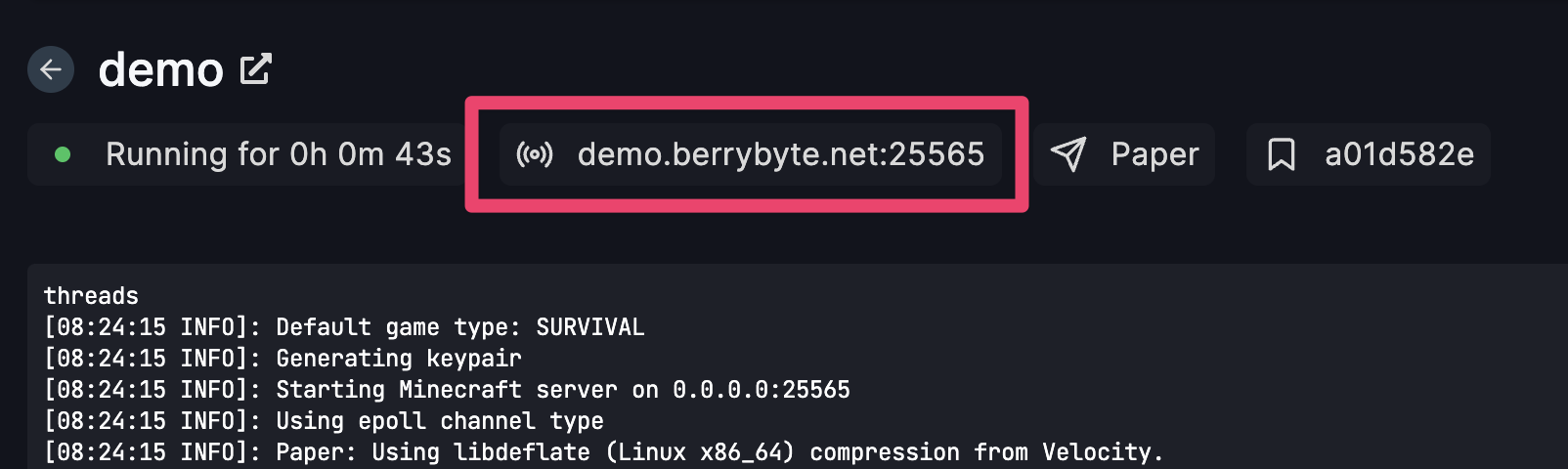 3. Click on the highlighted area box and it will copy the IP to your clipboard
## Joining the multiplayer Palworld server
1. Launch Palworld
2. Select **Join Multiplayer Game** from the main menu
3. Click on the highlighted area box and it will copy the IP to your clipboard
## Joining the multiplayer Palworld server
1. Launch Palworld
2. Select **Join Multiplayer Game** from the main menu
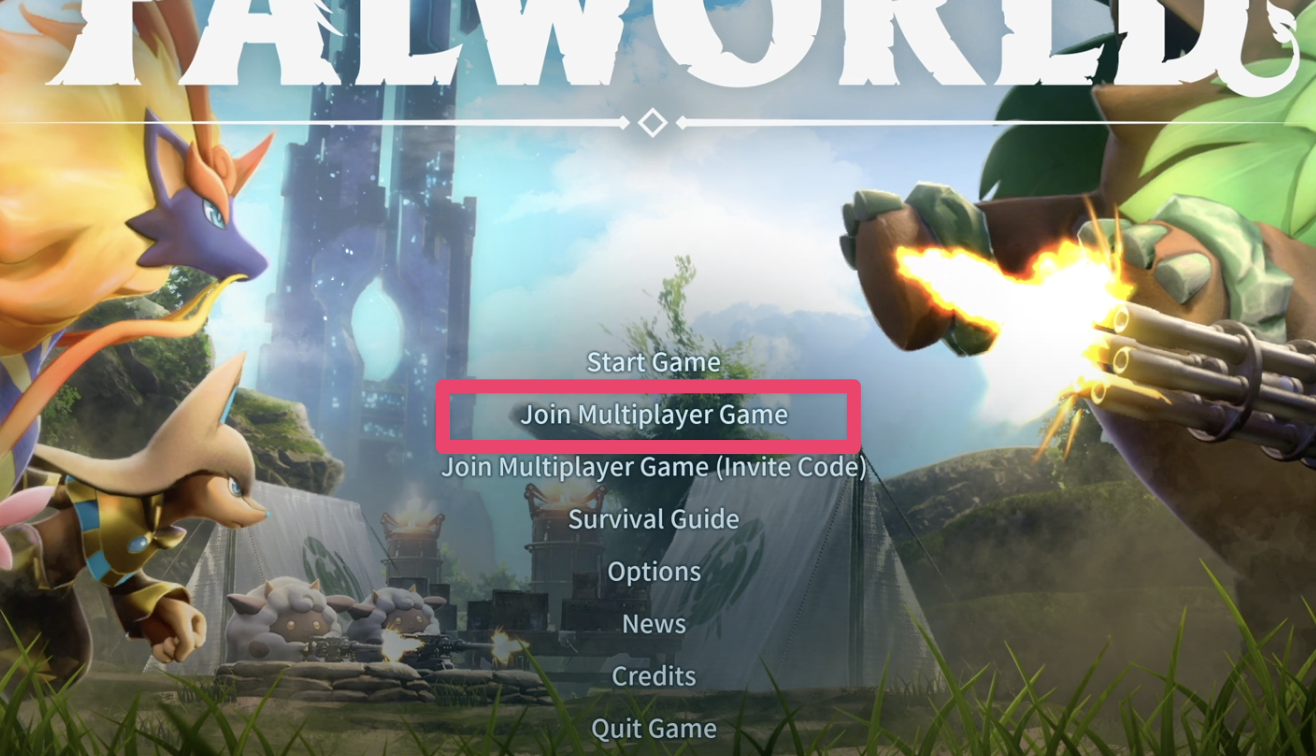 3. Enter the IP address and port of your server into the field at the bottom
4. Click **Connect** which will connect and load you into your multiplayer server!
Allow the server a few moments to accept the connection and then voilà, you should now be able to join your Palworld server!
## Common Issues
* **"Failed to connect to server" error**: Server may be offline or IP address incorrect
* **Solution**: Verify server is running in control panel and double-check IP address
* **Connection timeout when joining**: Network connectivity or firewall blocking connection
* **Solution**: Check firewall settings and ensure ports 8211 and 27015 are accessible
* **Server not appearing in list**: Direct connection required for dedicated servers
* **Solution**: Use the IP address connection method instead of server browser
* **Version mismatch error**: Client and server running different Palworld versions
* **Solution**: Ensure both client and server are updated to the same version
## Related Guides
* [Setup Palworld Server](/games/palworld/setup-server) - Initial server configuration
* [Configure Server Settings](/games/palworld/configure-server-settings) - Customize gameplay options
* [Control Panel Overview](/panel/overview) - Understanding your server management interface
* [Minecraft Server Connection](/games/minecraft/join-server) - Similar connection process for Minecraft
* [General Connection Troubleshooting](/games/minecraft/common-errors/connection-timed-out) - Fix common connection issues
Running into issues? Join our [Discord community](https://berrybyte.net/discord) or [contact support](https://berrybyte.net/tickets).
3. Enter the IP address and port of your server into the field at the bottom
4. Click **Connect** which will connect and load you into your multiplayer server!
Allow the server a few moments to accept the connection and then voilà, you should now be able to join your Palworld server!
## Common Issues
* **"Failed to connect to server" error**: Server may be offline or IP address incorrect
* **Solution**: Verify server is running in control panel and double-check IP address
* **Connection timeout when joining**: Network connectivity or firewall blocking connection
* **Solution**: Check firewall settings and ensure ports 8211 and 27015 are accessible
* **Server not appearing in list**: Direct connection required for dedicated servers
* **Solution**: Use the IP address connection method instead of server browser
* **Version mismatch error**: Client and server running different Palworld versions
* **Solution**: Ensure both client and server are updated to the same version
## Related Guides
* [Setup Palworld Server](/games/palworld/setup-server) - Initial server configuration
* [Configure Server Settings](/games/palworld/configure-server-settings) - Customize gameplay options
* [Control Panel Overview](/panel/overview) - Understanding your server management interface
* [Minecraft Server Connection](/games/minecraft/join-server) - Similar connection process for Minecraft
* [General Connection Troubleshooting](/games/minecraft/common-errors/connection-timed-out) - Fix common connection issues
Running into issues? Join our [Discord community](https://berrybyte.net/discord) or [contact support](https://berrybyte.net/tickets).