> ## Documentation Index
> Fetch the complete documentation index at: https://docs.berrybyte.net/llms.txt
> Use this file to discover all available pages before exploring further.
# How to Configure Palworld Server Settings - Complete Customization Guide
> Comprehensive guide to customizing Palworld server settings including XP rates, death penalties, PvP options, and gameplay mechanics. Learn both GUI and manual configuration methods for optimal server management.
# How to Configure Palworld Server Settings
Customizing your Palworld server settings allows you to create the perfect gameplay experience for your community. Whether you want to adjust XP rates for faster progression, modify death penalties, or fine-tune resource collection rates, this guide covers both the user-friendly GUI method and manual configuration editing for complete control over your server.
## Configure Palworld Server Settings
1. Open the **Palworld Settings** tab
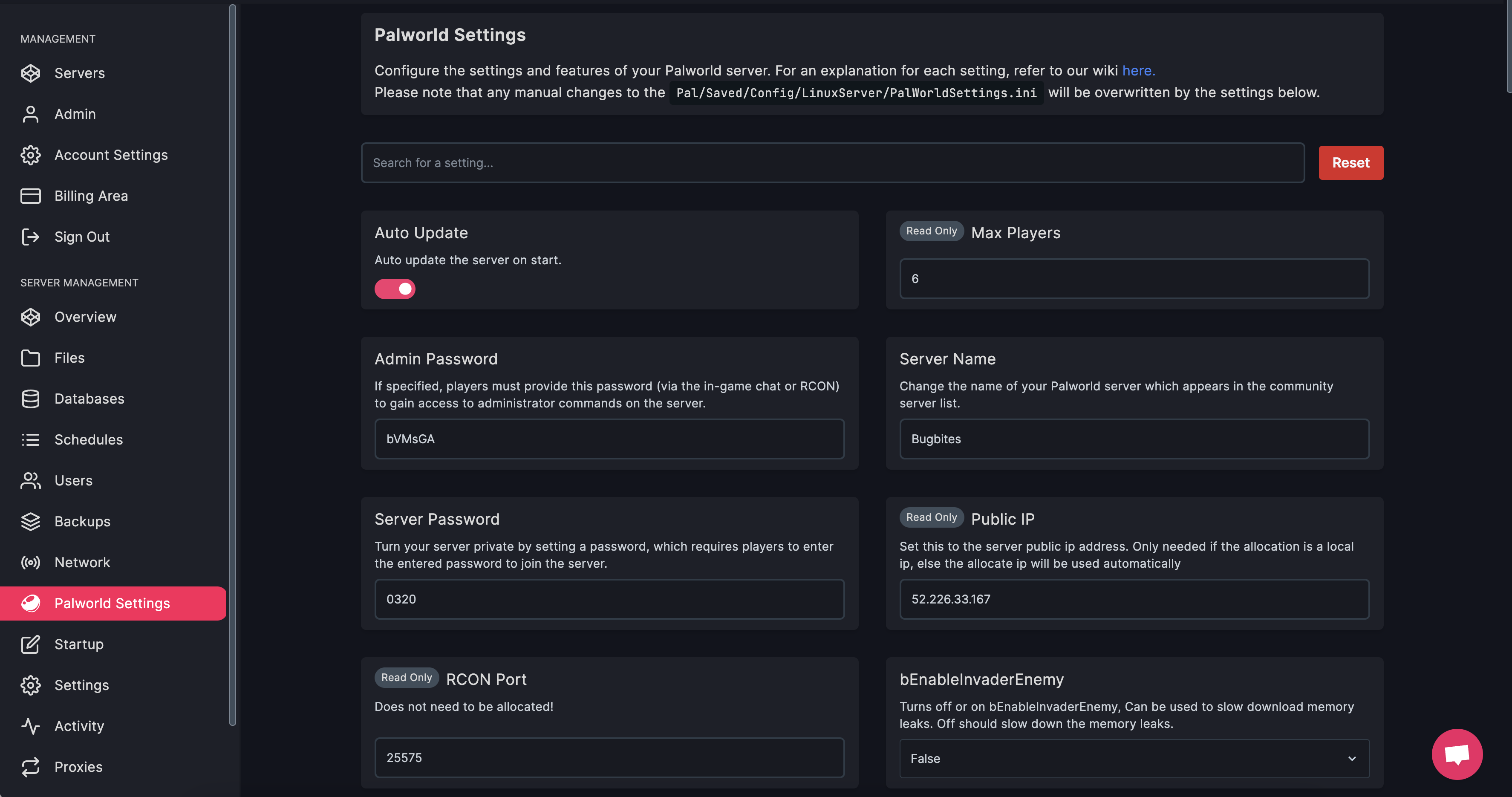 2. Search for the option/settings you want to change
3. Edit the field with your desired value or option
4. **Restart** the server
## Editing Palworld Server Settings (manual)
1. **Stop** the server
2. Navigate to **Pal** -> **Saved** -> **Config** -> **LinuxServer** -> **PalWorldSettings.ini**
2. Search for the option/settings you want to change
3. Edit the field with your desired value or option
4. **Restart** the server
## Editing Palworld Server Settings (manual)
1. **Stop** the server
2. Navigate to **Pal** -> **Saved** -> **Config** -> **LinuxServer** -> **PalWorldSettings.ini**
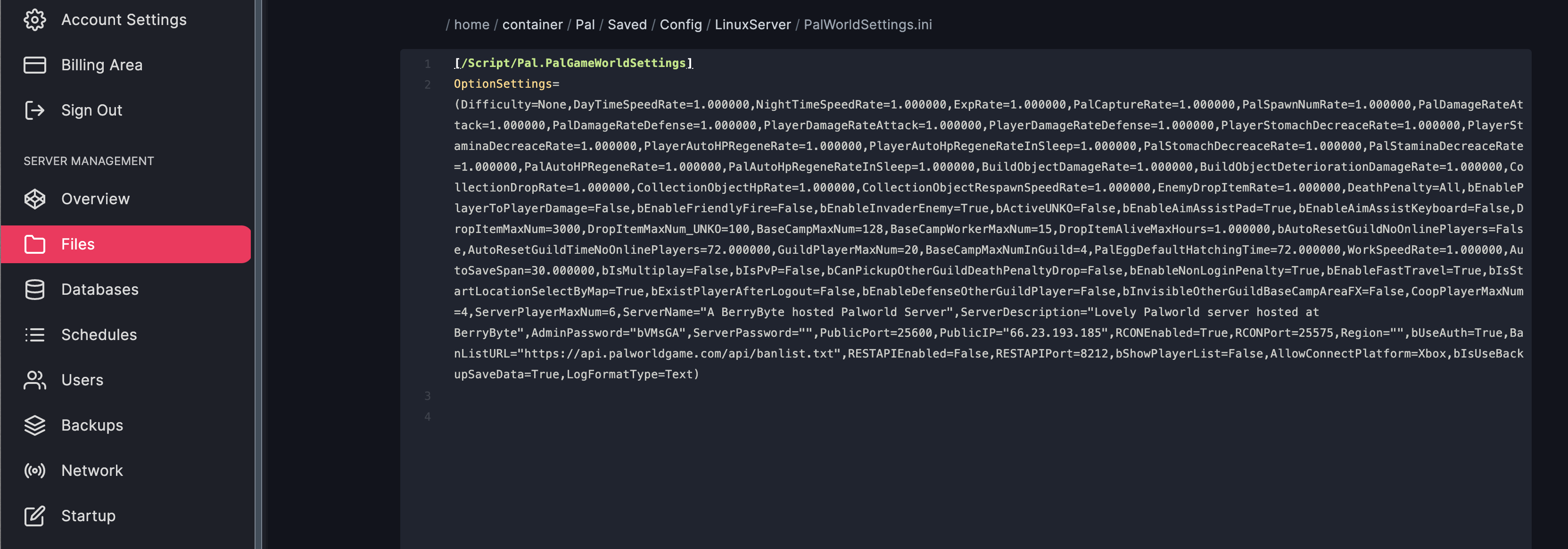 3. Make your changes and save the file
4. **Start** the server
Make sure your server is stopped before making changes, otherwise the changes will get reset!
After you're done, the file should look something like this (notice how it's on two lines):
```
[/Script/Pal.PalGameWorldSettings]
OptionSettings=(Difficulty=None,DayTimeSpeedRate=1.000000,NightTimeSpeedRate=1.000000,ExpRate=1.000000,PalCaptureRate=1.000000,PalSpawnNumRate=1.000000,PalDamageRateAttack=1.000000,PalDamageRateDefense=1.000000,PlayerDamageRateAttack=1.000000,PlayerDamageRateDefense=1.000000,PlayerStomachDecreaceRate=1.000000,PlayerStaminaDecreaceRate=1.000000,PlayerAutoHPRegeneRate=1.000000,PlayerAutoHpRegeneRateInSleep=1.000000,PalStomachDecreaceRate=1.000000,PalStaminaDecreaceRate=1.000000,PalAutoHPRegeneRate=1.000000,PalAutoHpRegeneRateInSleep=1.000000,BuildObjectDamageRate=1.000000,BuildObjectDeteriorationDamageRate=1.000000,CollectionDropRate=1.000000,CollectionObjectHpRate=1.000000,CollectionObjectRespawnSpeedRate=1.000000,EnemyDropItemRate=1.000000,DeathPenalty=All,bEnablePlayerToPlayerDamage=False,bEnableFriendlyFire=False,bEnableInvaderEnemy=True,bActiveUNKO=False,bEnableAimAssistPad=True,bEnableAimAssistKeyboard=False,DropItemMaxNum=3000,DropItemMaxNum_UNKO=100,BaseCampMaxNum=128,BaseCampWorkerMaxNum=15,DropItemAliveMaxHours=1.000000,bAutoResetGuildNoOnlinePlayers=False,AutoResetGuildTimeNoOnlinePlayers=72.000000,GuildPlayerMaxNum=20,PalEggDefaultHatchingTime=72.000000,WorkSpeedRate=1.000000,bIsMultiplay=False,bIsPvP=False,bCanPickupOtherGuildDeathPenaltyDrop=False,bEnableNonLoginPenalty=True,bEnableFastTravel=True,bIsStartLocationSelectByMap=True,bExistPlayerAfterLogout=False,bEnableDefenseOtherGuildPlayer=False,CoopPlayerMaxNum=4,ServerPlayerMaxNum=32,ServerName="Default Palworld Server",ServerDescription="",AdminPassword="",ServerPassword="",PublicPort=8211,PublicIP="",RCONEnabled=False,RCONPort=25575,Region="",bUseAuth=True,BanListURL="https://api.palworldgame.com/api/banlist.txt")
```
You can view a list of all the settings you can change [here](https://palworld.wiki.gg/wiki/PalWorldSettings.ini).
## Common Issues
* **Settings reset after server restart**: Changes made while server was running
* **Solution**: Always stop the server before editing PalWorldSettings.ini file
* **Configuration file appears empty**: File may not have been generated yet
* **Solution**: Start the server once to generate default configuration files
* **Invalid configuration syntax**: Incorrect formatting in settings file
* **Solution**: Ensure all settings are on one line and properly formatted as shown in example
* **Changes don't take effect**: Server cache or incorrect file location
* **Solution**: Restart server after changes and verify you're editing the correct config file
## Related Guides
* [Enable PvP](/games/palworld/enable-pvp) - Set up player vs player combat
* [Set Server Password](/games/palworld/set-server-password) - Protect your server access
* [Server Backups](/panel/backups) - Backup before making configuration changes
* [V Rising Server Configuration](/games/vrising/configure-server-settings) - Cross-game configuration guide
* [Soulmask Server Configuration](/games/soulmask/change-server-settings) - Similar configuration process
Need help configuring settings on your [Palworld server](https://berrybyte.net/palworld-server-hosting)? Shoot us a message on our [community Discord server](https://berrybyte.net/discord) or [contact support](https://berrybyte.net/support).
3. Make your changes and save the file
4. **Start** the server
Make sure your server is stopped before making changes, otherwise the changes will get reset!
After you're done, the file should look something like this (notice how it's on two lines):
```
[/Script/Pal.PalGameWorldSettings]
OptionSettings=(Difficulty=None,DayTimeSpeedRate=1.000000,NightTimeSpeedRate=1.000000,ExpRate=1.000000,PalCaptureRate=1.000000,PalSpawnNumRate=1.000000,PalDamageRateAttack=1.000000,PalDamageRateDefense=1.000000,PlayerDamageRateAttack=1.000000,PlayerDamageRateDefense=1.000000,PlayerStomachDecreaceRate=1.000000,PlayerStaminaDecreaceRate=1.000000,PlayerAutoHPRegeneRate=1.000000,PlayerAutoHpRegeneRateInSleep=1.000000,PalStomachDecreaceRate=1.000000,PalStaminaDecreaceRate=1.000000,PalAutoHPRegeneRate=1.000000,PalAutoHpRegeneRateInSleep=1.000000,BuildObjectDamageRate=1.000000,BuildObjectDeteriorationDamageRate=1.000000,CollectionDropRate=1.000000,CollectionObjectHpRate=1.000000,CollectionObjectRespawnSpeedRate=1.000000,EnemyDropItemRate=1.000000,DeathPenalty=All,bEnablePlayerToPlayerDamage=False,bEnableFriendlyFire=False,bEnableInvaderEnemy=True,bActiveUNKO=False,bEnableAimAssistPad=True,bEnableAimAssistKeyboard=False,DropItemMaxNum=3000,DropItemMaxNum_UNKO=100,BaseCampMaxNum=128,BaseCampWorkerMaxNum=15,DropItemAliveMaxHours=1.000000,bAutoResetGuildNoOnlinePlayers=False,AutoResetGuildTimeNoOnlinePlayers=72.000000,GuildPlayerMaxNum=20,PalEggDefaultHatchingTime=72.000000,WorkSpeedRate=1.000000,bIsMultiplay=False,bIsPvP=False,bCanPickupOtherGuildDeathPenaltyDrop=False,bEnableNonLoginPenalty=True,bEnableFastTravel=True,bIsStartLocationSelectByMap=True,bExistPlayerAfterLogout=False,bEnableDefenseOtherGuildPlayer=False,CoopPlayerMaxNum=4,ServerPlayerMaxNum=32,ServerName="Default Palworld Server",ServerDescription="",AdminPassword="",ServerPassword="",PublicPort=8211,PublicIP="",RCONEnabled=False,RCONPort=25575,Region="",bUseAuth=True,BanListURL="https://api.palworldgame.com/api/banlist.txt")
```
You can view a list of all the settings you can change [here](https://palworld.wiki.gg/wiki/PalWorldSettings.ini).
## Common Issues
* **Settings reset after server restart**: Changes made while server was running
* **Solution**: Always stop the server before editing PalWorldSettings.ini file
* **Configuration file appears empty**: File may not have been generated yet
* **Solution**: Start the server once to generate default configuration files
* **Invalid configuration syntax**: Incorrect formatting in settings file
* **Solution**: Ensure all settings are on one line and properly formatted as shown in example
* **Changes don't take effect**: Server cache or incorrect file location
* **Solution**: Restart server after changes and verify you're editing the correct config file
## Related Guides
* [Enable PvP](/games/palworld/enable-pvp) - Set up player vs player combat
* [Set Server Password](/games/palworld/set-server-password) - Protect your server access
* [Server Backups](/panel/backups) - Backup before making configuration changes
* [V Rising Server Configuration](/games/vrising/configure-server-settings) - Cross-game configuration guide
* [Soulmask Server Configuration](/games/soulmask/change-server-settings) - Similar configuration process
Need help configuring settings on your [Palworld server](https://berrybyte.net/palworld-server-hosting)? Shoot us a message on our [community Discord server](https://berrybyte.net/discord) or [contact support](https://berrybyte.net/support).