> ## Documentation Index
> Fetch the complete documentation index at: https://docs.berrybyte.net/llms.txt
> Use this file to discover all available pages before exploring further.
# How to Join a Minecraft Server
> Guide to connecting to Minecraft servers on Java and Bedrock Edition.
# How to Join a Minecraft Server
Connect to your Minecraft server on Java or Bedrock Edition.
## Find Your Server IP
You need your server's IP address (numbers like `104.167.215.1`) or subdomain (like `test.berrybyte.net`) to connect.
1. Go to the [berrybyte game panel](https://game.berrybyte.net)
2. Find the IP:port or subdomain below your server name
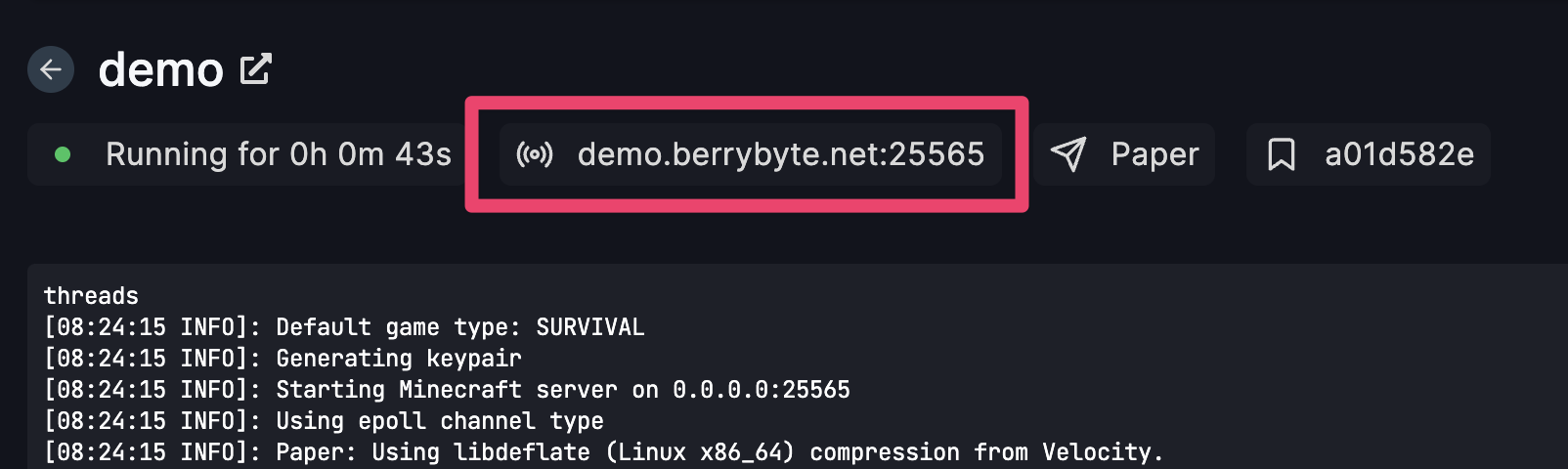 3. Click the highlighted area to copy the IP
## Joining on Java Edition
1. Launch Minecraft
2. Click **Multiplayer**
3. Click **Add Server**
4. Enter a name and your server's IP:port
5. Click the server from your list to join
**Tip:** You can also use **Direct Connection** to connect without adding the server first.
## Joining on Bedrock Edition
1. Launch Minecraft and click **Play**
2. Go to the **Servers** tab
3. Scroll down and click **Add Server**
4. Enter the **Server Name**, **Server Address**, and **Port**, then click **Save**
5. Select your server and click **Join Server**
Wait a few seconds for the connection to establish.
## Common Issues
**Connection timed out**
* Server may be offline or firewall blocking connection
* Check server status in control panel and verify IP is correct
**Can't resolve hostname**
* DNS issues or wrong server address
* Try using the numeric IP instead of subdomain
**Outdated client/server**
* Version mismatch between client and server
* Make sure your Minecraft version matches the server
**Bedrock players can't join Java server**
* Different editions aren't compatible by default
* Install the [Geyser plugin](/games/minecraft/plugins/geyser) for cross-platform play
## Related Guides
* [Geyser Plugin Setup](/games/minecraft/plugins/geyser) - Let Bedrock players join Java servers
* [Connection Timeout Fix](/games/minecraft/common-errors/connection-timed-out) - Fix connection issues
* [Control Panel Overview](/panel/overview) - Server management guide
Need help? Join our [Discord](https://berrybyte.net/discord) or [contact support](https://berrybyte.net/tickets).
3. Click the highlighted area to copy the IP
## Joining on Java Edition
1. Launch Minecraft
2. Click **Multiplayer**
3. Click **Add Server**
4. Enter a name and your server's IP:port
5. Click the server from your list to join
**Tip:** You can also use **Direct Connection** to connect without adding the server first.
## Joining on Bedrock Edition
1. Launch Minecraft and click **Play**
2. Go to the **Servers** tab
3. Scroll down and click **Add Server**
4. Enter the **Server Name**, **Server Address**, and **Port**, then click **Save**
5. Select your server and click **Join Server**
Wait a few seconds for the connection to establish.
## Common Issues
**Connection timed out**
* Server may be offline or firewall blocking connection
* Check server status in control panel and verify IP is correct
**Can't resolve hostname**
* DNS issues or wrong server address
* Try using the numeric IP instead of subdomain
**Outdated client/server**
* Version mismatch between client and server
* Make sure your Minecraft version matches the server
**Bedrock players can't join Java server**
* Different editions aren't compatible by default
* Install the [Geyser plugin](/games/minecraft/plugins/geyser) for cross-platform play
## Related Guides
* [Geyser Plugin Setup](/games/minecraft/plugins/geyser) - Let Bedrock players join Java servers
* [Connection Timeout Fix](/games/minecraft/common-errors/connection-timed-out) - Fix connection issues
* [Control Panel Overview](/panel/overview) - Server management guide
Need help? Join our [Discord](https://berrybyte.net/discord) or [contact support](https://berrybyte.net/tickets).