> ## Documentation Index
> Fetch the complete documentation index at: https://docs.berrybyte.net/llms.txt
> Use this file to discover all available pages before exploring further.
# How to Transfer Enshrouded World Save to Server
> Comprehensive guide to transferring local Enshrouded world saves to your dedicated server. Learn how to locate save files, backup existing worlds, and upload custom worlds for multiplayer gameplay.
# How to Transfer Enshrouded World Save to Your Server
Transferring your local Enshrouded world save to a dedicated server allows you to continue your survival progress with friends in multiplayer. This comprehensive guide covers the complete process of locating your save files, safely backing up existing server data, and uploading your custom world for seamless multiplayer continuation.
## Preparing the Server
1. Login to the berrybyte [game control panel](https://game.berrybyte.net)
2. **Stop** the server via the control panel.
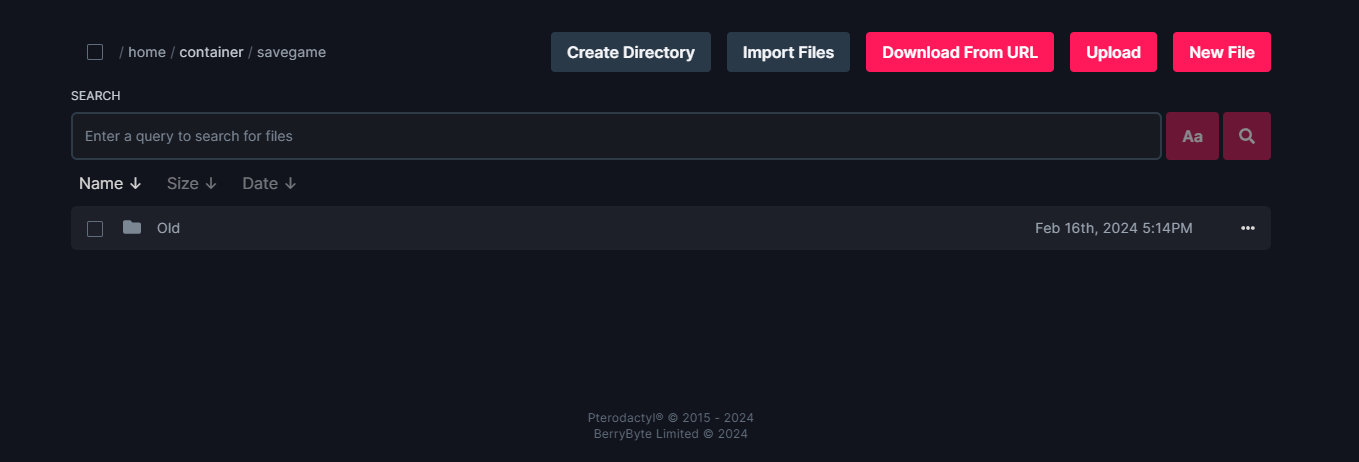
 3. Go to Files and select the savegame folder.
4. Create a new directory called "old" and drag all the files to it.
5. This will create a backup of the world, just to be safe. Configure full server backups [here](/panel/backups).
3. Go to Files and select the savegame folder.
4. Create a new directory called "old" and drag all the files to it.
5. This will create a backup of the world, just to be safe. Configure full server backups [here](/panel/backups).
 ## Locating the Enshrouded world files
1. To explore the Enshrouded world files, locate the installation directory of steam. This often located under \**C:\Steam\**
2. Navigate to the following directory: **\Steam\userdata"steamid"\1203620\remote**
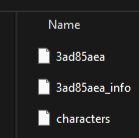
3. Locate the file with a string of 8 characters. This is often called **3ad85aea**
NOTE: If the game file has a different name please rename it to **3ad85aea** before uploading.
## Locating the Enshrouded world files
1. To explore the Enshrouded world files, locate the installation directory of steam. This often located under \**C:\Steam\**
2. Navigate to the following directory: **\Steam\userdata"steamid"\1203620\remote**
3. Locate the file with a string of 8 characters. This is often called **3ad85aea**
NOTE: If the game file has a different name please rename it to **3ad85aea** before uploading.
 ## Copying the file
1. This can either be done via the upload button in [game control panel](https://game.berrybyte.net) or simply drag and drop the file
Voila. Your new file is added. Happy Playing
## Common Issues
* **Save file not found in Steam directory**: Different Steam installation or user profile
* **Solution**: Check alternative Steam installation paths or verify correct Steam user ID
* **World doesn't load after transfer**: Incorrect file naming or corrupted save data
* **Solution**: Ensure file is named "3ad85aea" exactly and verify save file integrity
* **Server crashes after world upload**: Incompatible save version or corrupted data
* **Solution**: Restore from backup and try re-exporting the save file from game
* **Progress lost after transfer**: Incomplete save file or missing character data
* **Solution**: Verify all save components are transferred and check for additional save files
## Related Guides
* [Join Enshrouded Server](/games/enshrouded/join-server) - Connect to your server after world transfer
* [Server Backups](/panel/backups) - Protect your world data with automatic backups
* [File Management](/panel/importing-files) - Learn more about uploading files to your server
* [Enshrouded Introduction](/games/enshrouded/introduction) - Learn more about Enshrouded server hosting
Need help updating your Enshrouded server? Shoot us a message on our [community Discord server](https://berrybyte.net/discord) or [contact support](https://berrybyte.net/support).
## Copying the file
1. This can either be done via the upload button in [game control panel](https://game.berrybyte.net) or simply drag and drop the file
Voila. Your new file is added. Happy Playing
## Common Issues
* **Save file not found in Steam directory**: Different Steam installation or user profile
* **Solution**: Check alternative Steam installation paths or verify correct Steam user ID
* **World doesn't load after transfer**: Incorrect file naming or corrupted save data
* **Solution**: Ensure file is named "3ad85aea" exactly and verify save file integrity
* **Server crashes after world upload**: Incompatible save version or corrupted data
* **Solution**: Restore from backup and try re-exporting the save file from game
* **Progress lost after transfer**: Incomplete save file or missing character data
* **Solution**: Verify all save components are transferred and check for additional save files
## Related Guides
* [Join Enshrouded Server](/games/enshrouded/join-server) - Connect to your server after world transfer
* [Server Backups](/panel/backups) - Protect your world data with automatic backups
* [File Management](/panel/importing-files) - Learn more about uploading files to your server
* [Enshrouded Introduction](/games/enshrouded/introduction) - Learn more about Enshrouded server hosting
Need help updating your Enshrouded server? Shoot us a message on our [community Discord server](https://berrybyte.net/discord) or [contact support](https://berrybyte.net/support).